What Data Rules are
Data Rules define who may query which data in Infinite Data, for how long, and with which protections.
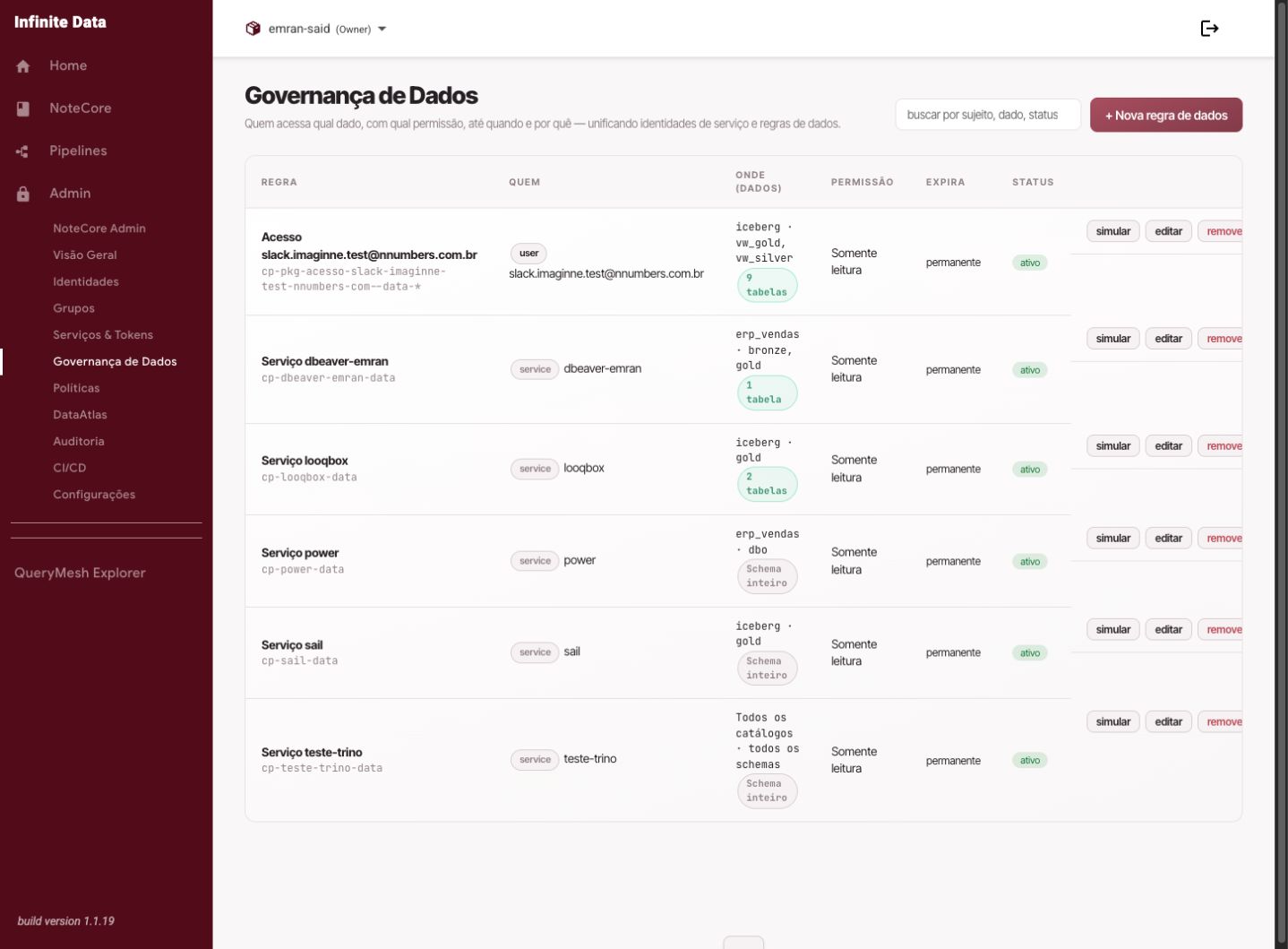
In Infinite Data's Data Governance, a Data Rule can grant access to a person, a group, or a service account. When the same access has to apply to several people, create a single rule for a Group and control access through that group's membership, adding or removing members.
Why: Infinite Data's governance helps avoid duplicate rules for the same data set. If a rule already covers exactly the same catalog, schema, and table, the Console may warn: "An access rule already covers the same data set." That message is about the data you chose, not about the person. The correct way to share is a Group: one rule, several members.
When to use this
- Use it when you need to grant or review access to data.
- Use it to explain governance to managers and data owners.
- Use it before creating a rule in the Console.
Before you start
- Know who needs the access: a user, a group, or a service account.
- Know which data will be used: the catalog, schema, table, and relevant columns.
- Know how long the access should last.
Step by step
- Open Data Governance.
- Review the existing rules to avoid duplication.
- Identify who receives the access: a person, a group, or a service account.
- If the same access applies to several people, use a group.
- Choose which data goes into the rule: a whole schema or specific tables.
- Choose protections where needed, such as expiry, masks, or filters.
- Simulate and review the summary before saving.
What happens next
- The action is recorded in the audit trail with the user, the time, the object affected, and the outcome.
- Access changes can take a short propagation period before they appear for everyone.
- Anyone affected should refresh the screen or open a new session after propagation.
Common errors
- Too broad a rule: prefer limiting it to specific tables where possible.
- No deadline: temporary access should have an expiry.
- The wrong person: confirm the user, group, or service account before saving.
- "An access rule already covers the same data set": another rule already covers that catalog, schema, and table. Use a group, or choose a different data set.
Good practice
- Apply least privilege by default.
- Use groups for any access shared by more than one person.
- Review rules periodically to remove access that no longer makes sense.
Next steps
Was this page helpful?
Report a problem on this pageDo not send passwords, keys, tokens, or customer data.