Using the Audit Center
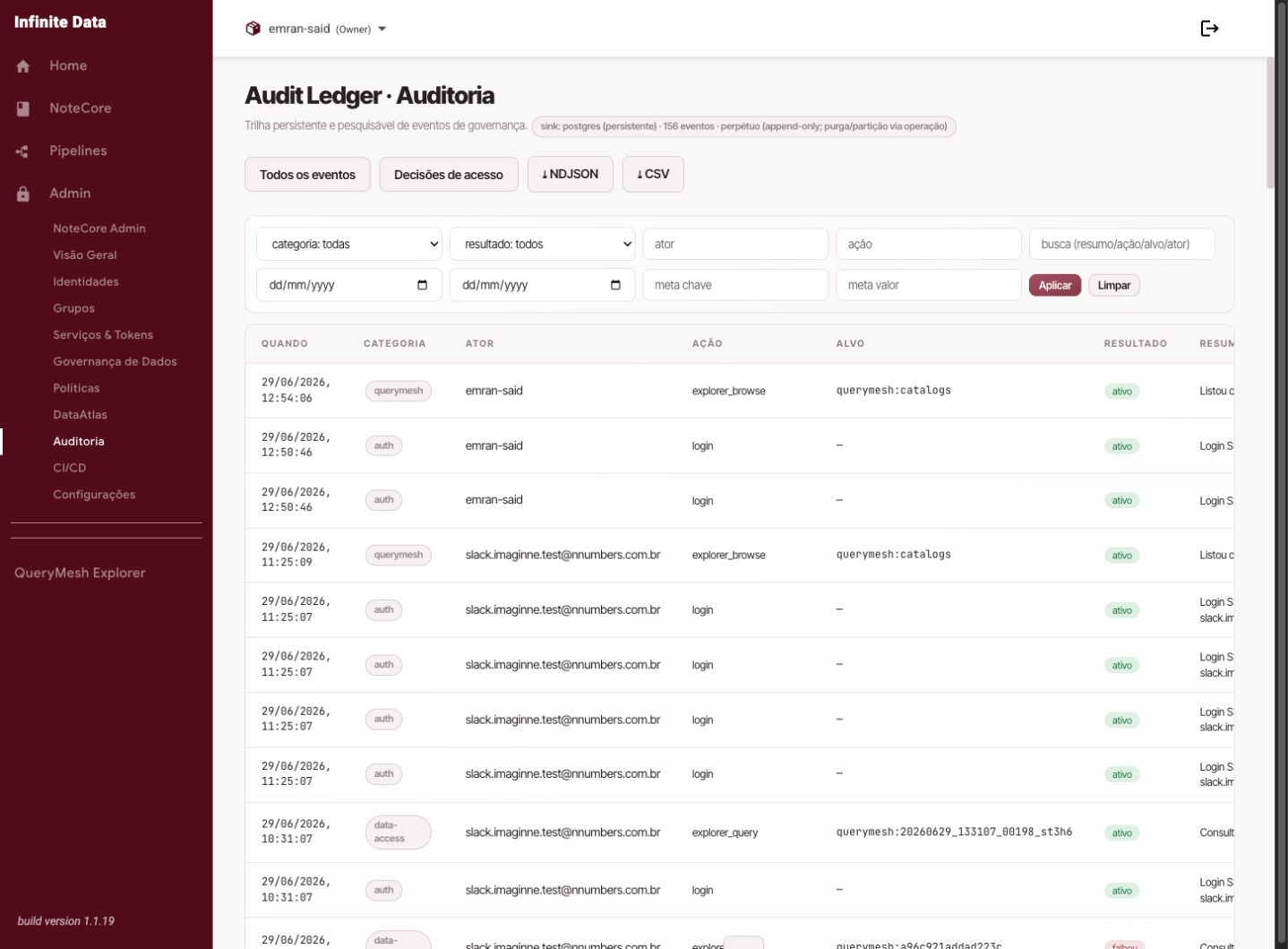
Use the Audit Center to search actions, access decisions, and evidence of Infinite Data use.
When to use this
- Use it in internal or external audits.
- Use it to investigate who changed access, a user, a group, or a service account.
- Use it to understand an access denial or a sensitive action.
Before you start
- Have an auditing role.
- Define the investigation's period.
- Have a user, group, table, or approximate action to filter by.
Step by step
- Open Audit Center.
- Choose the period to analyze.
- Use the filters by person, group, outcome, or action type.
- Open the relevant record.
- Read who took the action, when it happened, and what the outcome was.
- Use the export when you need to share evidence formally.
What happens next
- You will have a searchable trail to support the investigation.
- The records help explain grants, changes, and denied access.
- Exported evidence should be treated as sensitive information.
Common errors
- Too wide a period: the filters get slow and hard to analyze.
- Investigating with no context: start from a known person, table, or action.
- Sharing an export without control: evidence can reveal access patterns.
Good practice
- Start with a short period and widen it if needed.
- Write down the investigation's hypothesis before filtering.
- Store evidence according to your organization's policy.
Next steps
Was this page helpful?
Report a problem on this pageDo not send passwords, keys, tokens, or customer data.