Access tokens
Downloading the environment configuration file
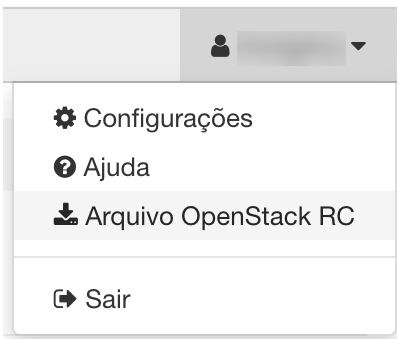
Download the file from the top-right menu, third item, as shown below. The file follows the POSIX standard and the OpenStack variable naming convention, so the variables it defines — as in other clouds — can be used by a range of client tools and frameworks.
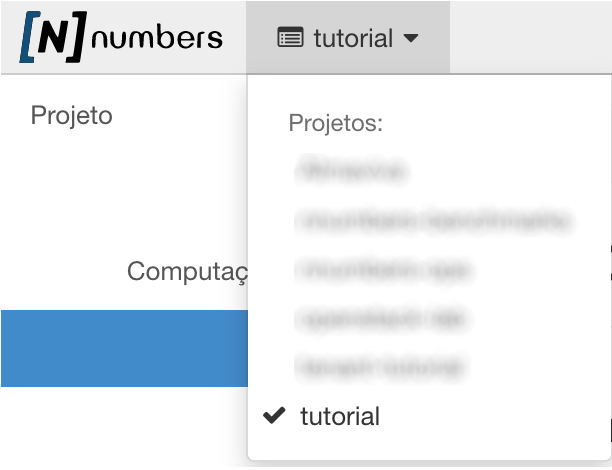
If you have access to more than one NNumbers Cloud tenant (project), make sure the right environment is selected beforehand in the top-left menu.
Setting the environment variables
With the downloaded file in hand[\8], you need to apply it to your shell so the environment variables are set, using the command[\9] below:
source <TENANT-NAME>-openrc.sh
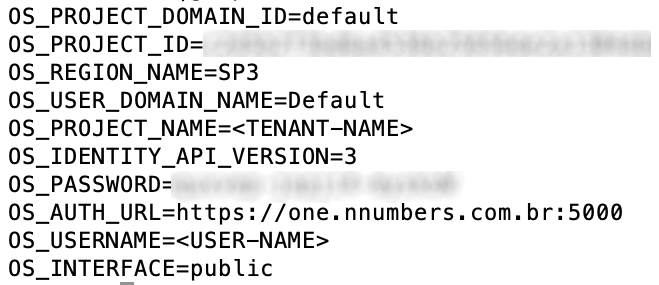
After running it, the following environment variables[\10] are available:
Calls to this API are subject to a rate limit that varies by account type. Keep token requests to a minimum so your application is not locked out for a while.
Creating an access token from application credentials
To create application credentials, see Creating an application credential
Put the application credentials into environment variables.
CLOUD_APP_ID="<APPLICATION_CREDENTIAL_ID>"
CLOUD_APP_SECRET="<APPLICATION_CREDENTIAL_SECRET>"
Call the API.
X_AUTH_TOKEN=$(curl -g -i -X POST https://cloud.nnumbers.com.br:5000/v3/auth/tokens/ \
-H "Content-Type: application/json" \
-d '
{ "auth": { "identity": { "methods": ["application_credential"], "application_credential": { "id": "$CLOUD_APP_ID", "secret": "$CLOUD_APP_SECRET" } } } }' \
2>&1 | grep x-subject-token | awk '{print $2}' | sed 's/[\n|\r]//g')

# prints the access token returned in the "x-subject-token" header
echo $X_AUTH_TOKEN
Creating an access token from user credentials
The commands below store the API response headers in a file named headers and the payload in token_info, from which two more environment variables are extracted — OS_TOKEN and OS_USER_ID — which are also used in the next request.
curl -s -D headers -H "Content-Type: application/json" -d '
{ "auth": {
    "identity": {
      "methods": ["password"],
      "password": {
        "user": {
          "name": "'$OS_USERNAME'",
          "domain": { "name": "'$OS_USER_DOMAIN_NAME'" },
          "password": "'$OS_PASSWORD'"
        }
      }
    },
    "scope": {
      "project": {
        "name": "'$OS_PROJECT_NAME'",
        "domain": { "name": "'$OS_USER_DOMAIN_NAME'" }
      }
    }
  }
}' "${OS_AUTH_URL}/v${OS_IDENTITY_API_VERSION}/auth/tokens" > token_info

export OS_TOKEN=$(egrep -i "^X-Subject-Token:" headers | awk '{print $2}')
export OS_USER_ID=$(cat token_info  | jq -r '.["token"]["user"]["id"]')
Next steps
Was this page helpful?
Report a problem on this pageDo not send passwords, keys, tokens, or customer data.