Subagents
A subagent is a focused specialist that carries out a well-scoped task — exploring the code, analyzing architecture, reviewing, implementing, testing — often in parallel and on the faster model. They let the main agent delegate clearly scoped work without losing the thread of the conversation.
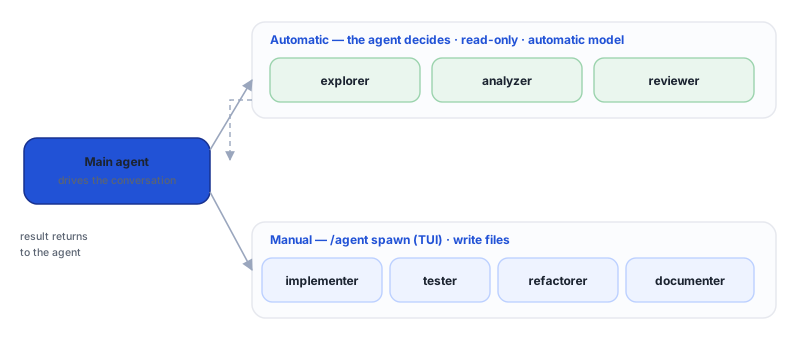
Two ways to run
- Automatic (the agent decides). For read-only work — exploring, analyzing, reviewing — the agent spins up a subagent on its own, synchronously. Only the
explorer,analyzer, andreviewertypes can be spun up this way. - Manual (you launch it). In the Terminal (TUI),
/agent spawn <type> <task>lets you launch any type — including the ones that write files (implementer, tester, refactorer, documenter).
Subagent types
| Type | Role | Writes? | Typical tools |
|---|---|---|---|
explorer | fast file/code search | no | read, search, list |
analyzer | structure/architecture analysis | no | read, search, list |
reviewer | review (security, performance, maintainability) | no | read, search |
implementer | implement features | yes | read, create, edit, run |
tester | create/run tests | yes | read, create, edit, run |
refactorer | refactor code | yes | read, edit, run |
documenter | documentation/READMEs | yes | read, create, edit |
Per-model routing
Lightweight/read-only subagents (explore, analyze, review) run in a lighter, faster configuration — ideal for scanning and summarizing. Planning/implementation work inherits the session's model. See Models.
Commands (/agent, in the TUI)
| Command | What it does |
|---|---|
/agent or /agent list | Lists the session's subagents. |
/agent spawn <type> <task> | Launches a subagent for a task. |
/agent status [id] | State of one (or all) subagents. |
/agent cancel <id> | Cancels a subagent. |
/agent kill <id> | Force-terminates it. |
/agent metrics | Counts, success rate, and tokens per type. |
/agent cost | Token budget: total, consumed, and remaining. |
Full reference in TUI commands.
Limits and budget
- Up to 8 concurrent subagents per session.
- A shared token budget across the subagents; once it's exceeded, new launches are refused.
- Limited depth: a subagent doesn't keep spawning others indefinitely.
- The automatic (read-only) subagent runs synchronously and has an output cap so it doesn't flood the context.
Use /agent metrics and /agent cost to track consumption and performance.
On each surface
- Terminal (TUI) — full control via
/agent(plus the agent's automatic spin-ups). - Desktop — the agent still uses read-only subagents automatically, but there is no
/agentcommand for manual launching. (The Desktop task panel, Ctrl+T, is a task checklist, not the subagent system.) - VS Code — Task Mode is a separate feature: a plan → step → report loop over your normal chat session, not Imaginne's local subagent system. See Using in VS Code.
See also
Was this page helpful?
Report a problem on this pageDo not send passwords, keys, tokens, or customer data.