Installation
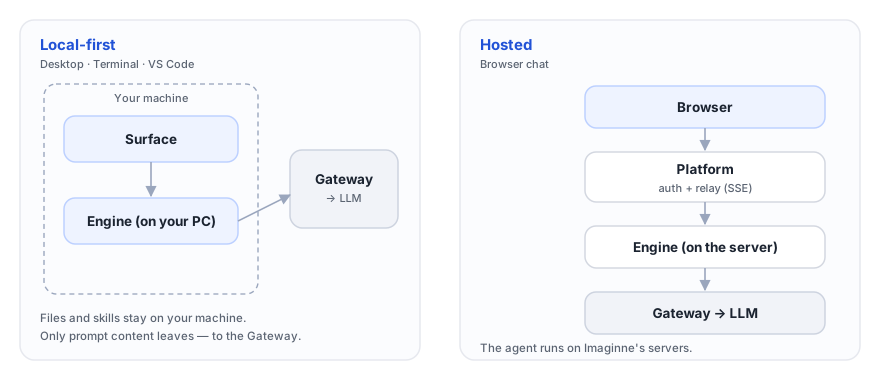
Imaginne has four surfaces. Three of them run the agent locally on your machine (Desktop, Terminal, and VS Code) and one runs on the server (the chat in your browser). This page helps you choose and points you to the guide for each one.
Every surface uses your organization's login. If you don't have access yet, ask an administrator to create your user in the console — you'll receive an email to set your password. There's no standalone sign-up, and creating the user does not generate any API key: authentication is always through the browser. See Identity & login.
The four ways to use it
Native app for macOS and Windows. The most complete experience.
Install Desktop →Terminal (TUI)The entire agent inside your terminal, via a single binary.
Install TUI →VS CodeAn extension that brings the agent into your editor.
Install extension →Chat in the browserNothing to install — just go and start chatting.
Open the chat →Comparison table
| Surface | What to install | Operating system | Best for |
|---|---|---|---|
| Desktop | Native app (.dmg / installer) | macOS, Windows | Daily use with voice, routines, remote sessions, and artifact preview. |
| Terminal (TUI) | The imaginne binary (via install.sh) | macOS, Linux, Windows | People who live in the terminal; automation and keyboard-driven workflows. |
| VS Code | The nnumbers.imaginne extension + the imaginne CLI | macOS, Linux, Windows | Developers: edit, test, and review code without leaving the editor. |
| Chat in the browser | Nothing | Anything with a browser | Quick access, a borrowed machine, working with attachments and projects without installing anything. |
On the app surfaces (Desktop, Terminal, VS Code), the Engine runs on your machine: files stay local and only the prompt content is sent. In web chat, the agent runs on the server. Understand the difference in Local execution and Architecture.
Channels: PROD and DEV
There are separate builds for two environments. Use the one your organization tells you to.
| Channel | Points to | Config folder |
|---|---|---|
| PROD (default) | ai.nnumbers.com.br | ~/.imaginne/ |
| DEV | your organization's validation environment | ~/.imaginne-dev/ |
The two channels do not share configuration or sessions — the DEV build writes to ~/.imaginne-dev/, fully isolated from PROD. This lets you keep both versions installed side by side. Each installation guide explains how to get the right channel (the -dev suffix on the TUI installer, on the extension, and on the app).
If no one told you otherwise, use PROD. The DEV channel exists for validation and early adoption, and may contain features that are still stabilizing.
Next steps
Pick your surface and follow the guide. If you'd rather see everything working end to end first, start with the Quickstart.
Was this page helpful?
Report a problem on this pageDo not send passwords, keys, tokens, or customer data.