What is Imaginne
Imaginne is an AI productivity platform. You talk to an agent in natural language; it understands your project, plans ahead, carries out tasks, generates artifacts — including images from prompts — and remembers what you've worked on together. What sets it apart from a traditional chatbot is where the agent runs and who decides what it's allowed to do.
Three ideas that define the product
- It runs where your work lives. On the Desktop, in the terminal, and in VS Code, the agent runs on your own computer: it reads and writes your files, executes commands in your shell, and generates artifacts in your folder. It's not "export and paste" — it's a colleague working right beside you.
- Capabilities are governed skills. What the agent knows how to do comes from skills — auditable packages with a name, a description, instructions, and, when needed, scripts. Your organization decides which skills each person sees.
- The organization stays in control. An administrator defines which AI models you can use, which skills appear for you, and which secrets the organization shares with each skill. You never have to configure provider API keys on your own.
How the pieces fit together

- Surfaces — Desktop, terminal (TUI), VS Code, and the chat in your browser. They are your window into the agent.
- Engine — the agent itself: it reasons, picks tools, reads and writes files, and runs commands. On the local surfaces, it runs on your machine.
- Gateway — the model broker. It's the only component that talks to the AI models.
- Platform — the control plane: identity, policy, skill governance, and the relay for remote sessions. It never runs your tools and never sees your files.
To go deeper, see Architecture.
Local-first, with one exception
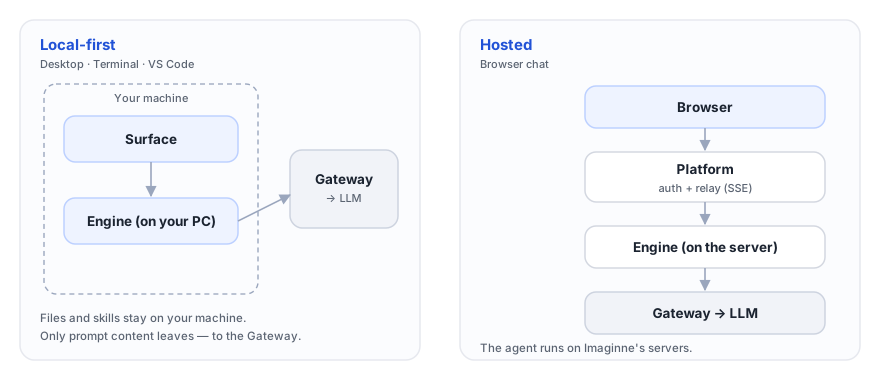
On the Desktop, in the terminal, and in VS Code, your files stay on your machine — only the prompt content (what the model needs to read in order to answer) is sent to the Gateway. The chat in your browser is the convenient exception: since nothing is installed, the agent runs on the server. The privacy details are in Local execution & privacy.
One identity, everywhere
You log in once, through the browser, with your organization's account. You receive a single authenticated session that works across every surface. You don't manage any provider API keys. See Identity & login.
Who this documentation is for
I want to install, log in, and start working with the agent.
Open →I'll publish skillsI want to build, test, and publish capabilities for my organization.
Open →I administer the organizationI want to manage users, policies, skills, keys, and secrets.
Open →Next steps
- Core concepts — the Imaginne vocabulary on a single page.
- Quickstart — from download to your first task.
Was this page helpful?
Report a problem on this pageDo not send passwords, keys, tokens, or customer data.