Env-secrets for skill authors
A skill that talks to an internal system — a CRM, a corporate API, a certificate — needs secrets. In Imaginne, the skill declares which secrets it needs; the organization registers the values; and Imaginne injects only the declared names, only at run time. This page is the author's side: how to declare and consume secrets. Registering the values is the admin's job — see Env-secrets (admin).
How the flow works
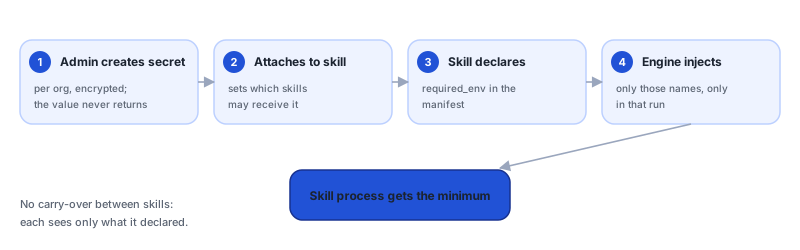
The core rule: secret values never reach the client as free data. The skill author never sees the value — they only reference the name. The moment the agent invokes the skill, Imaginne resolves only the names the skill declared and injects them as environment variables into that skill's process. When the skill finishes, they vanish with the process.
Declaring the secrets
There are two ways to declare, and the validator requires them to be consistent with each other when both appear.
Form 1 — required_env (simple contract)
A list of environment variable names:
name: lead_proposal
version: "1.0.0"
description: Generates a proposal from a CSV of leads.
required_env:
  - CRM_API_TOKEN
  - CRM_BASE_URL
Form 2 — env.secrets[] (structured block)
Each secret points to a reference (secret_ref) and marks whether it's required:
schema_version: 1
skill_key: lead-proposal
name: lead_proposal
version: "1.0.0"
description: Generates a proposal from a CSV of leads.
env:
  secrets:
    - name: CRM_API_TOKEN
      secret_ref: crm-api-token
      required: true
    - name: CRM_BASE_URL
      secret_ref: crm-base-url
      required: true
When the manifest carries required_env and env.secrets[] at the same time, the names must be coherent. A mismatch is rejected on import/publish. When in doubt, use just one form.
The variable names follow the environment convention: uppercase, digits, and underscore (^[A-Z][A-Z0-9_]{0,127}$). It's the same format the admin uses when registering the secret in the organization.
How Imaginne injects
At the skill's invocation, Imaginne:
- Reads the names the skill declared (
required_env/env.secrets). - Resolves only those names against the organization's secrets.
- Filters to the declared set and injects them as environment variables into the skill's process.
In your script, you read the secrets like any environment variable:
import os

token = os.environ["CRM_API_TOKEN"]
base_url = os.environ["CRM_BASE_URL"]
Each skill receives only the secrets it declared. There's no leakage from one skill to another: what skill A declares is not available to skill B. Each execution starts clean.
When a secret is missing
If the skill declares a required secret the organization hasn't registered yet (or hasn't attached to the skill), the execution fails with missing_required_env. This is a configuration error, not a code error: the admin needs to register the secret and attach it to the skill. See Env-secrets (admin) and the troubleshooting page.
In SKILL.md, list the secrets the skill needs and what each one represents ("CRM_API_TOKEN — CRM read token"). That way the agent knows the context and the admin knows what to register.
Author checklist
- I declared each secret in
required_envorenv.secrets[](with no mismatch). - The names follow
^[A-Z][A-Z0-9_]{0,127}$. - The scripts read the secrets via
os.environ(never hardcoded). -
SKILL.mddocuments each secret. - I told the admin which secrets to register and attach to the skill.
See also
Was this page helpful?
Report a problem on this pageDo not send passwords, keys, tokens, or customer data.