Credentials & secrets
Imaginne handles three kinds of credential, all under the same principle: the credential lives on the server, is write-only, and is never returned to a client app. They are the model-vendor keys (BYOK), the secrets used by skills (env-secrets), and the user's session identity token. This page explains each from a security standpoint.
Common principle: write-only and out of the client
- Write-only. When you register a key or secret, you provide the value; after that, the interface shows at most the last four characters. There is no reading the full value back.
- Never reaches the client. Desktop, the TUI, and the VS Code extension receive neither vendor keys nor env-secrets. The component that uses the vendor keys is the Gateway (on the server); the one that injects env-secrets is the local Engine, but only into the process of the skill that declared them — and the value is not accessible to the conversation.
- Under the organization's control. These resources are administered in the
/appconsole, not by the end user.
BYOK — per-organization vendor keys
With BYOK ("bring your own key"), the organization uses its own vendor accounts instead of the platform's shared key.
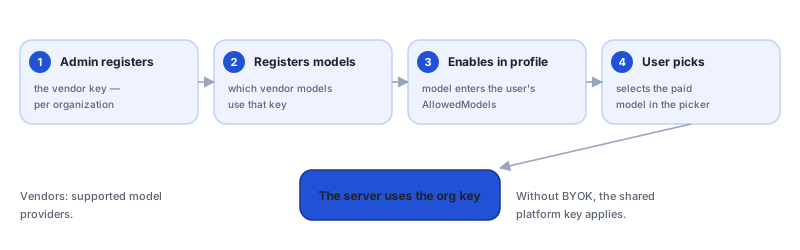
- Scope: per organization, not per user. A user with permission goes out through the paid model using the organization's key.
- Vendors: chosen by the organization from the supported model providers (see Administration → BYOK).
- Write-only value: shows only the last 4 digits after registration.
- Models: registering the key is not enough — you must Manage models (register the vendor's models, with a display name and max tokens), and the model must also be in the profile's
AllowedModels. Without a registered model, the call fails withbyok_no_model. - Operations: Health check, Rotate (replace the value), and Delete.
- Without BYOK: the platform's shared key applies.
Operational details in Administration → BYOK.
Env-secrets — secrets used by skills
Env-secrets are per-organization secrets (third-party API tokens, certificates, internal-system credentials) that a skill needs in order to work.
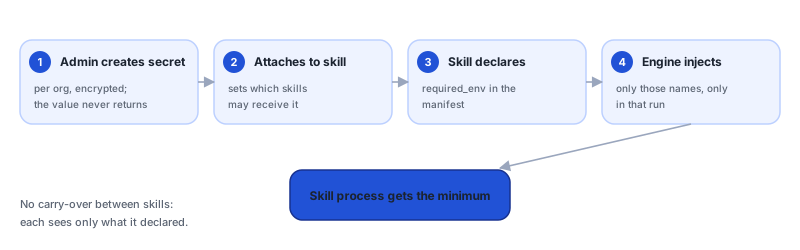
- Scope: per organization. Name in the format
^[A-Z][A-Z0-9_]{0,127}$, unique per organization; typestring,pem, orjson. - Write-only value: just like BYOK.
- Restricted injection. At a skill's dispatch, the Engine resolves only the names declared by the skill (
required_env/env.secrets), filters down to what it requires, and injects them into that skill's process. - No carry-over. A secret injected into one skill does not carry over to another. Each skill receives only what it declares.
- Missing secret: the skill fails with
missing_required_env— the administrator must register and attach the secret (Manage skills).
Injection by declared name means a skill only "sees" the secrets it needs. Attaching an env-secret to a skill is an explicit decision by the administrator.
Operational details in Administration → Env-secrets.
The session identity token
Access to Imaginne is only by login through the browser, which produces an opaque session token.
- One session, everywhere: the same session token works across every Imaginne surface. It is per organization.
- Never shown in the clear.
/whoamishows your identity without revealing the token; and if the token appears in a prompt body, content redaction replaces it with a placeholder. - Revocable. Revoking the session cuts off access quickly — there are no scattered keys to collect.
- No user keys. Creating a user generates neither a password nor an API key — access is always through the organization's login session.
See Identity.
Rotation and deletion
| Action | BYOK | Env-secret |
|---|---|---|
| Rotation | Rotate replaces the value; manual. | Rotate replaces the value; manual. |
| Deletion | Delete. | Delete — refused with 422 while the secret is referenced by any skill (use force=true to force). |
| Effect of the swap | The Gateway starts using the new value on subsequent calls. | The skill's next run receives the newly injected value. |
The deletion lock on env-secrets prevents you from deleting a secret a skill still depends on without confirming your intent.
Why this is secure
- Minimal client-side exposure surface: the app never stores vendor keys or env-secrets.
- A single, revocable user secret: the session token, which is not displayed and is redacted if it leaks into a prompt.
- Least privilege for skills: injection of only what is declared, with no propagation between skills.
See also
Was this page helpful?
Report a problem on this pageDo not send passwords, keys, tokens, or customer data.